



Using Japanese language on your computer
You can display  , or Japanese, on your computer in some ways. With appropriate software, you can type and edit Japanese as well (i.e. no specific hardware required). This page provides some (relatively historical) information to help in handling Japanese.
Softwares that help Japanese handling
Note that the latest OSs such as Windows 98/2000/XP and MacOS 8/9/X should have the built-in functionality to provide world wide language support (e.g., install all Japanese supports with English version of Windows 2000, and set 'default language' to Japanese). Please consult your manual or ask a computer shop.
DOS/Windows and Japanese
- Microsoft Global IME - by launching any language version of Word 2000, Internet Explorer 5.01 or greater, or Outlook Express then selecting Global IME 5.02 from the taskbar, you can write the language you choose. And you can input Chinese, Japanese, and Korean text into supported applications.
- UnionWay provides AsianSuite, a suite of multilingual Windows applications which run on any of Microsoft Windows products and supports for Chinese, Japanese, and Korean language on Windows. It also has a multilingual P2P software.
- NJSTAR from Australia provides CJK Viewer and Word Processors - NJWIN is a "plugin" software designed to enable normal windows programs to display and print CJK characters under the standard English and Western Windows environment. Also, Japanese Word Processor for Windows 95/98/ME/NT/2000/XP.
- TWINBRIDGE - its CJK Partner allows Enable you to display, edit and print Chinese, Japanese or Korean documents, supporting most internal codes including Unicode for CJK characters. Japanese font download also available.
- Basis Technology's RJ (Read Japanese!) is a Windows program that helps you read and understand Japanese. Simply click on characters and words to instantaneously view their pronunciation, meaning, and much more information.
- The Monash Nihongo ftp Archive provides very rich resources to use Japanese language, though some technical knowledge may required.
- KDPlus by Jan Stumpel is an improved version of the KD kanji driver program by Izumi Ohzawa. KDPLUS can be used to obtain Japanese character display, and allow Japanese character input, in many text-mode programs for MS-DOS (historical).
- NeocorTech's Tsunami MT Version 6.0 English to Japanese translator provides both a Japanese Kanji and Kana text editor/FEP, a machine translator, and cross-platform compatibility (NeocorTech was acquired by speech and language technology leader Lernout & Hauspie, which went bankrupt in 2001. So who knows about Tsunami today ?).
Via Web (any system)
- Japanese WWW Page viewer is a gateway to display Japanese characters as graphics.
General Information on Japanese processing
- Jim Breen's Japanese Page provides a lot of interesting and useful things related to Japanese processing. Quite active.
- The Technical Japanese Program at University of Washingtons is a unique inter-engineering program that combines study in advanced technical Japanese with graduate-level engineering courses.
- Japanese text encoding is a useful document describing some technical aspects of Japanese on computer.
- The Japanese Homepage by Foreign Languages and Literature, St. Cloud State University, is a source of Japan and Japanese language.
- A Guide to Japanese E-mail, by Atsushi Fukada & Kazumi Hatasa at Purdue University, is a good documentation on Japanese and methods to use it in e-mail
- Ken Lunde, the author of the magnificent book on Japanese, Understanding Japanese Information Processing provided some Japanese code manipulation tools. Archives of his CJK.INF file is detailed online document explaining Chinese, Japanese and Korean language character sets and endcoding.
- (All Douglas Horn's pages seem disappeared 2003...) Douglas Horn wrote many articles on Japanese language processing, including It's time to teach your computer Japanese, Q & A and Japanese Internet Primer.
To display Japanese with:
Netscape Navigator and Internet Explorer
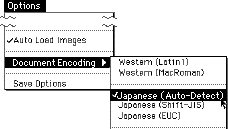 If you have Japanese system installed on your computer, things are qute simple.
- Pull down "Options" menu from the menubar
(or "
View" menu if you use version 4) - Select Japanese (Auto-Detect) from submenu of Document Encoding (or
Character SetorFont) - If necessary, save your options (or "Set default")
or if you prefer Lynx
- Obtain your copy of Lynx from, for example, http://lynx.browser.org/. Now Win95 version is available.
- Open configuration file (i.e. Lynx.cfg)
- Find CHRACTER_SET option and set it to Japanese (SJIS)
- Run Lynx. If still has a problem, check Option and set CJK mode ON
Disclaimer: I am not able to choose one of above products to recommend you, because I have not tested all of them (and, even if I did, I already have Japanese systems so it's impossible to check their Japanese capability). Please visit each site and judge by yourself. Also see my disclaimer page.